Features
Besides sampling the Python stacks of a process to measure where time is spent, Austin can collect a range of other information, often from the same run.
| Feature | Option | Description |
|---|---|---|
| Multi-process applications | -C/--children |
Sample the child processes of the target too |
| Sub-interpreters | Sample all the sub-interpreters of each process | |
| Thread names | Report threads by their threading name |
|
| Where? | -w/--where |
Print the current stacks of a running process |
| Memory and full metrics | -m/--memory, -f/--full |
Sample memory deltas, or time, memory and CPU state in one run |
| Garbage collector | -g/--gc |
Mark the samples taken while the GC is collecting |
| Asyncio support | Track the asyncio task graph on CPython 3.14+ |
|
| Native frame stack | -n/--native |
Collect native call stacks alongside the Python ones |
| Column-level locations | Report column-level location information on CPython 3.11+ |
Multi-process Applications
Austin can be told to profile multi-process applications with the -C or
--children switch. This way Austin will look for new children of the parent
process.
See the examples for how to profile a multi-process application such as an Apache2 WSGI server.
Sub-interpreters
Austin has support for Python applications that make use of sub-interpreters. This means that Austin will sample all the sub-interpreters that are running within each process making up the Python application.
Since Austin 3.6.0.
Thread Names
Austin reports Python threads by the name they have in the threading module
(e.g. MainThread), whenever this can be resolved. Threads that are not known
to the threading module, like those created by native extensions, are
reported by their thread ID.
Since Austin 4.1.0.
Where?
If you are only interested in what is currently happening inside a Python
process, you can have a quick overview printed on the terminal with the
-w/--where option. This takes the PID of the process whose threads you want to
inspect, e.g.
sudo austin -w `pgrep -f my-running-python-app`
Below is an example of what the output looks like
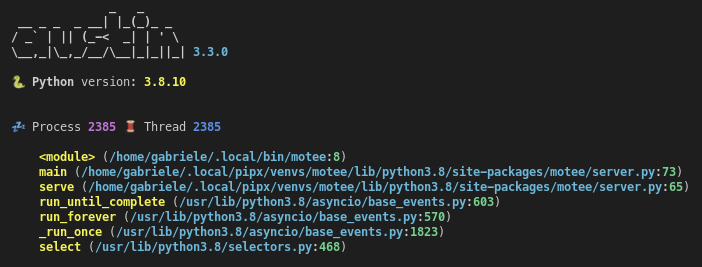
This works with the -C/--children option too. The emojis to the left indicate
whether the thread is active or sleeping and whether the process is a child or
not.
The where option also supports native mode and renders the asyncio task graph of applications running on CPython 3.14 or later.
Since Austin 3.3.0.
Memory and Full Metrics
When profiling in memory mode with the -m or --memory switch, the metric
value associated with each stack is the memory delta between samples, measured
in bytes. In full mode (-f or --full switches), each sample will include
both a time and memory metric, plus the information of whether the stack was on
CPU. This is useful if you want to collect wall-time/CPU-time and memory
profiles in a single run.
Note
The reported memory allocations and deallocations are obtained by computing resident memory deltas between samples. Hence these values give an idea of how much physical memory is being requested/released.
Note
Memory profiling in free-threaded Python builds is less accurate, as without the GIL there is no reliable way of attributing memory deltas to the thread that caused them.
Garbage Collector Sampling
Austin can sample the Python garbage collector state. If the -g/--gc option
is passed, Austin will mark each collected sample that was taken while the
garbage collector was collecting. This gives you a measure of how busy the
Python GC is during a run.
Since Austin 3.1.0.
Asyncio Support
For applications running on CPython 3.14 or later, Austin can also track the
asyncio task graph: each event loop's own tasks, the coroutine chain each
task is currently suspended at or executing, and the await relationships
between tasks.
When profiling, the collected samples are attributed to the task that is running on the sampled thread, and the stacks of the suspended tasks are reported together with the await relationships between tasks. This allows tools like the Austin VS Code extension to reconstruct a task-level view of the application that also accounts for the time tasks spend waiting. The MOJO format page describes how this information is encoded.
With -w/--where, tasks are rendered as a tree nested
under the thread whose event loop owns them, so you can see at a glance which
coroutines each task is waiting on. Tasks whose owning thread has since
terminated are listed separately as orphaned.
Note
Asyncio task tracking is not currently available in native
mode (-n/--native).
Since Austin 4.1.0.
Native Frame Stack
If you want observability into the native frame stacks, you can pass the
-n/--native option to collect native call stacks alongside the Python ones,
e.g.
austin -n -i 1ms -o profile.mojo python myscript.py
Native frames are interleaved with the Python frames that they belong to, and are reported with the path of the binary they come from and the name of the function, resolved from the binary's symbol table. In native mode, Austin also samples threads that are not running any Python code, like those created by native extensions, to give a more comprehensive view of what is running within a Python process. The where option also supports native mode.
Native mode is available on Linux (x86_64 and aarch64), macOS and Windows (x86_64), and requires no additional dependencies. On any other platforms or architectures, the option is ignored with a warning.
Warning
To capture a consistent native stack, Austin needs to briefly suspend each
thread while sampling it. Therefore, the impact on the tracee is no longer
minimal and it becomes higher at smaller sampling intervals. For this
reason, consider using larger sampling intervals in native mode (e.g.
-i 1ms or higher), and avoid using it in production environments.
Note
On Windows, symbols are resolved with DbgHelp. For accurate function names,
make sure that the PDB files of the binaries of interest are available,
e.g. by setting the _NT_SYMBOL_PATH environment variable to point to a
symbol server, as described in the Windows
documentation.
Since Austin 4.1.0.
The austinp variant
On Linux, the austinp variant of austin provides an alternative native
mode, which also supports architectures other than x86_64 and aarch64, as well
as the sampling of kernel call stacks. It can be obtained by compiling the
source with -DAUSTINP, or from the released binaries.
austinp makes use of ptrace to halt the application and grab a
snapshot of the call stack with libunwind. If you are compiling austinp from
sources make sure that you have the development version of the libunwind
library available on your system, for example on Ubuntu,
sudo apt install libunwind-dev binutils-dev
and compile with
gcc -O3 -Os -Wall -pthread src/*.c -DAUSTINP -lunwind-ptrace -lunwind-generic -lbfd -o src/austinp
then use as per normal. The extra -k/--kernel option is available with
austinp which allows sampling kernel call stacks as well.
Warning
Since austinp uses ptrace, the impact on the tracee is no longer minimal
and it becomes higher at smaller sampling intervals. Therefore the use of
austinp is not recommended in production environments. For this reason,
the default sampling interval for austinp is 10 milliseconds.
The austinp-resolve tool from the austin-python Python package can be used
to resolve the VM addresses to source and line numbers, provided that the
referenced binaries have DWARF debug symbols. Internally, the tool uses
addr2line(1) to determine the source name and line number given an address,
when possible.
Note
Whilst austinp comes with a stripped-down implementation of addr2line,
it is only used for the "where" option, as resolving symbols at runtime is
expensive. This is to minimise the impact of austinp on the tracee, increase
accuracy and maximise the sampling rate.
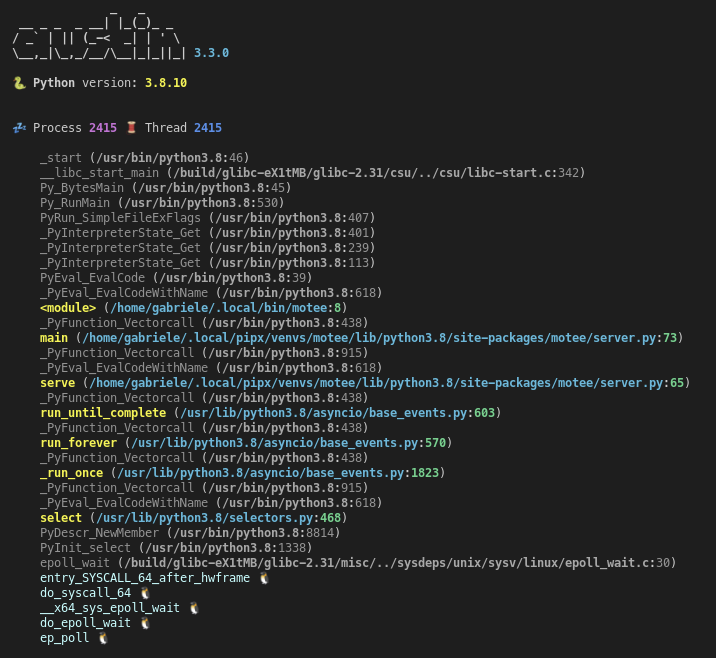
The where option is also available for the austinp
variant and will show both native and Python frames. Highlighting helps tell
frames apart. The -k option outputs Linux kernel frames too, as shown in this
example
Note
If you have installed Austin from the Snap Store, the austinp executable
will be available as austin.p from the command line.
Column-level Location Information
Since Python 3.11, code objects carry finer-grained location information at the column level. When using the binary MOJO format, Austin can extract this extra location information when profiling code running with versions of the interpreter that expose this data.
Since Austin 3.5.0.