Usage
Usage: austin [-CcfgmnP?V] [-x n_sec] [-i n_us] [-o FILE] [-p PID] [-t n_ms]
               [-w PID] command [ARG...]

Austin is a frame stack sampler for CPython that is used to extract profiling
data out of a running Python process (and all its children, if required) that
requires no instrumentation and has practically no impact on the tracee.

Options:
  -C, --children              Attach to child processes.
  -c, --cpu                   Sample on-CPU stacks only.
  -x, --exposure <n_sec>      Sample for n_sec seconds only.
  -f, --full                  Produce the full set of metrics (time +mem -mem).
  -g, --gc                    Sample the garbage collector state.
  -i, --interval <n_us>       Sampling interval in microseconds (default is
                              100). Accepted units: s, ms, us.
  -m, --memory                Profile memory usage.
  -n, --native                Collect native call stacks alongside Python
                              stacks.
  -o, --output <FILE>         Specify an output file for the collected samples.
  -p, --pid <PID>             Attach to the process with the given PID.
  -P, --pipe                  Pipe mode. Use when piping Austin output.
  -t, --timeout <n_ms>        Start up wait time in milliseconds (default is
                              3000). Accepted units: s, ms.
  -w, --where <PID>           Dump the stacks of all the threads within the
                              process with the given PID.
  -?, --help                  Give this help list.
      --usage                 Give a short usage message.
  -V, --version               Print program version.

Report bugs at https://github.com/P403n1x87/austin/issues
Austin generates binary output in the MOJO format. This is a
compact binary representation of the collected data that can be processed by
the mojo2austin tool that comes with the austin-python Python package to
produce the more commonly used collapsed stack format. The MOJO format can also
be converted to the Speedscope JSON format using the austin2speedscope tool
that also comes with the austin-python Python package.
Tip
The recommended way to visualise Austin profiles is with the Austin VS Code
extension. It opens .mojo files directly and renders interactive flame
graphs, source-level annotations, and thread breakdowns without any extra
conversion steps. The extension also ships with an MCP
server that lets coding agents query profiling
data autonomously, and the austin-query tool lets them query
profiles from the command line.
If you prefer command-line tools such as Brendan Gregg's
flamegraph.pl to generate flame graph visualisations, you first
need to convert Austin's MOJO output to collapsed stack format with the
mojo2austin utility from the austin-python package:
pip install austin-python
mojo2austin profile.mojo /dev/stdout | flamegraph.pl > profile.svg
Open profile.svg in a browser to explore the interactive flame graph.
Note
Austin writes binary MOJO data to stdout by default, so piping Austin's
output directly into flamegraph.pl will not work. Always save to a file
first (with -o profile.mojo or output redirection) and then convert with
mojo2austin.
Important
If you are running Austin directly in a terminal, make sure to either
redirect the output to a file or give a destination file with the
-o/--output option to avoid the terminal being flooded with binary data.
Examples
To profile a Python script, run Austin with the command
austin -o profile.mojo python myscript.py
To profile a running Python application, attach Austin to it with the
-p/--pid option, e.g.
austin -o profile.mojo -p <pid>
where <pid> is the process ID of the running Python application you want to
profile. If you also want to profile the child processes of the target
application, add the -C/--children option to the command line:
austin -o profile.mojo -Cp <pid>
For example, to profile an Apache2 WSGI application, one can attach Austin to the web server with
austin -Cp `pgrep apache2 | head -n 1` > profile.mojo
Any child processes will be automatically detected as they are created and Austin will sample them too.
Environment variables
Some behaviour of Austin can be configured via environment variables.
| Variable | Effect |
|---|---|
AUSTIN_NO_LOGGING |
Disables all log messages (since Austin 3.4.0). |
AUSTIN_PAGE_SIZE_CAP |
Cap the page size used to perform remote reads (since Austin 4.0.0). |
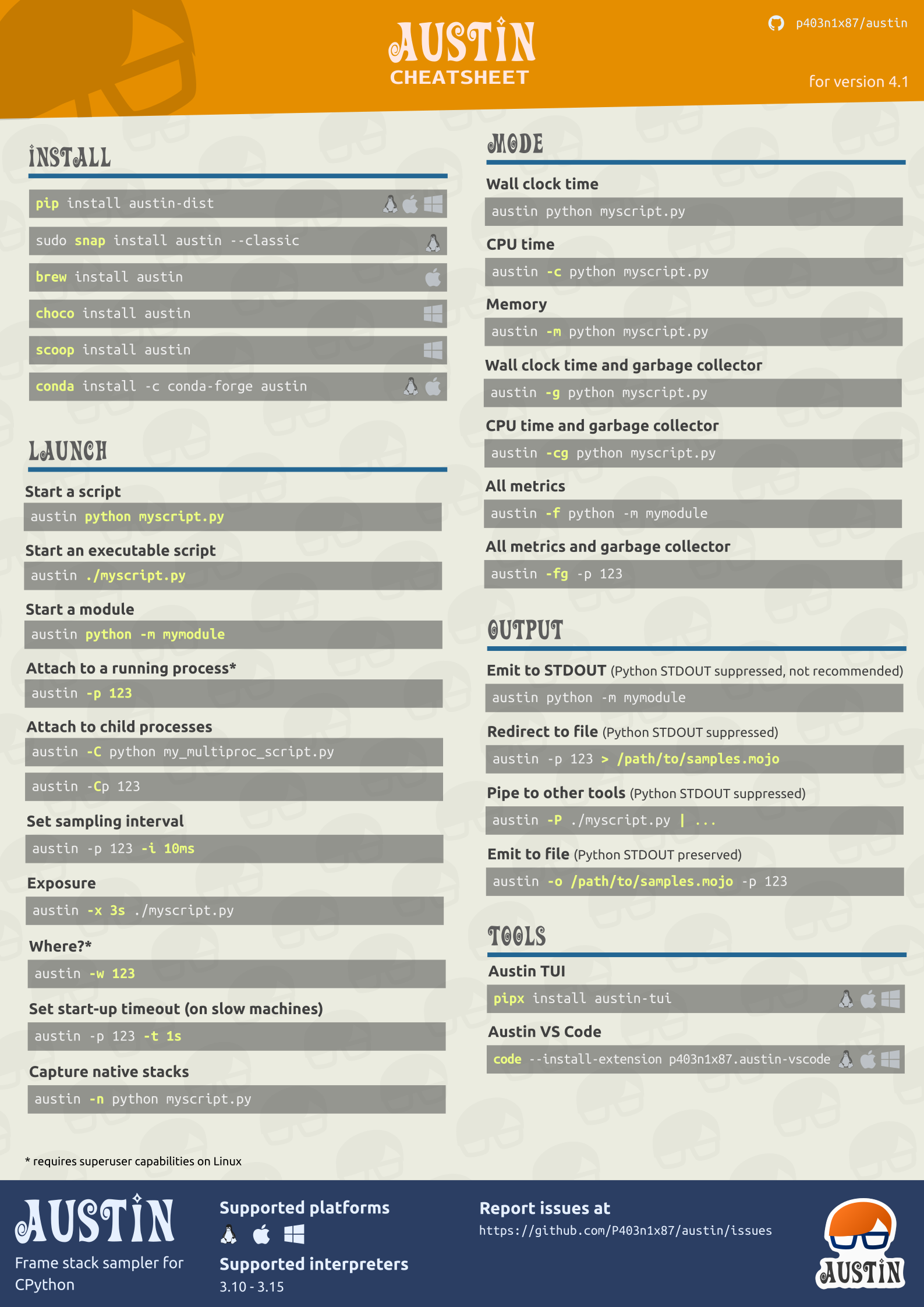
Cheat sheet
All the above Austin options and arguments are summarised in a cheat sheet, available in the SVG, PDF and PNG formats.